

Every time you tap the promotion button inside the Facebook or Instagram app on your iPhone, Apple immediately withholds 30% of the amount spent, stopping that money from reaching the ad auctions (Meta Help Center, rule in force since February 2024). Doing the same operation from an ordinary browser window on your computer, you get that whole 30% back to spend on real visibility.
The guide starts here, from the most common waste and the easiest to eliminate. It explains step by step how to proceed without touching Ads Manager, covering how the main controls work, choosing the objective, defining the audience, setting the budget and analyzing the final data.
In short
- The command is called "Boost post" on Facebook and "Promote" on Instagram, and it turns an existing post into a paid campaign without requiring new graphics.
- Always run promotions through a browser (facebook.com, instagram.com) or with Meta Business Suite, avoiding the iPhone app, which imposes a 30% surcharge (Meta, 2024).
- The minimum daily spend starts at €1, but an effective test phase requires between €5 and €10 a day for a full week.
- A broad audience combined with quality content beats detailed interest selection: texts that name the reader's gender generate a click-through rate of 0.86% against 1.39% for versions with neutral text (Shaddy, Friedman and Toubia, Journal of Consumer Research, 2025).
- The interface is converting the old Likes into new followers (Meta, 2026), and to increase them you must select the objective "Get more Page followers".
What happens when you boost a post?
Meta's system takes a piece of content already on your profile and distributes it for a fee in front of a new audience that does not know your business. The ad appears with the label "Sponsored" inside feeds, Stories and Reels on Facebook and Instagram, keeping the original text, comments and reactions accumulated earlier intact. The people reached can interact by leaving a Like, sending a private message, following the Page or visiting an external link depending on the call-to-action button you configured.
Compared with the advanced tools of Ads Manager inside Business Manager, this quick procedure gives up some complex functions. You cannot track specific events through the Pixel, you cannot run A/B comparison tests, you cannot upload customer databases and you are barred from creating retargeting segments based on website visitors. What you get is a single screen you can fill in within minutes, which enters the same competitive auction used by large companies.
This operational simplicity delivers good results if you pursue linear, limited goals, such as showing a well-liked piece of content to people in your city, increasing followers, collecting contacts on WhatsApp or bringing an audience to an event. If instead you need to track the exact cost of every single transaction on an e-commerce site, you need the full Ads Manager infrastructure.
Using this tool responds to an evident numerical need: the average organic engagement rate for a business Page on Facebook stops at 2.2% (Hootsuite, 2025), as illustrated in our analysis of organic reach in 2026. Without an advertising budget behind them, your posts reach only a tiny fraction of the people who follow the Page.
Why should you never boost from the iPhone app?
Since February 2024, promotions started from the Facebook or Instagram app on iOS devices go through Apple's payment circuit, which applies a fixed fee equal to 30% of the total spend, calculated gross of taxes and additional charges (Meta Help Center, 2026). Meta highlights this extra cost in its support documentation, and also requires advance payment via prepaid credits for boosted reels on iOS.
The post shown to users stays identical in every respect. Meta's systems distribute the post in the same way, regardless of whether it is started from facebook.com, instagram.com, Meta Business Suite or Ads Manager. The difference concerns only the percentage of money taken out of your promotional investment.
You can avoid this additional cost by following four official routes:
- Open facebook.com or instagram.com from your computer's browser or from your smartphone's browser, proceeding with the standard settings.
- Manage the promotion through the Meta Business Suite app, on mobile or from a computer.
- Top up your ad funds in advance by going to the payments area on facebook.com, then spend that balance even from iOS without fees.
- Set up the campaign using the Ads Manager mobile app.
Android devices are not subject to any additional charge. Whoever uses an iPhone simply has to spend a few minutes at the computer to save 30% of the advertising budget on every single launch.
What do you need before you start?
You need four basic elements, and the first two are already available if you regularly manage an online presence.
- An active Facebook Page with full access rights or authorization for advertising activities, since personal profiles do not support advertising functions.
- An Instagram profile set up as a professional account, which you can activate from the Settings section via the item "Switch to a professional account".
- A valid ad account linked to a registered payment method, bearing in mind that at the first launch on Instagram you will be asked whether to link an existing Facebook account or keep a separate one.
- Content that meets the promotional requirements, ruling out from the start image collections, posts shared by third parties, unpublished drafts, profile photos, simultaneous combinations of photos and videos or live broadcasts from unverified Pages (Meta, 2026).
Reels require precise technical requirements that you must plan before recording: the video must last at most 90 seconds, use the full-screen vertical 9:16 format, use royalty-free audio tracks from Meta's Sound Collection avoiding commercially copyrighted music, exclude clickable stickers, GIFs, face filters or product tags, not already be shared on Facebook and have been uploaded after October 15, 2021 (Instagram Help Center, 2026).
Pay attention to two specific constraints during setup. If the message touches banking, job offers, real estate transactions, civil rights or politics, you must select the "Special ad category" so as not to run into an account block by the automatic checks. In addition, users in the European Union who have chosen the ad-free subscription or reduced profiling in the Accounts Center face operational limits in managing ads (Meta, 2026).
How to boost a post on Facebook, step by step
Working from desktop, follow the steps formalized by the Meta Help Center (2026):
- Log in to your Facebook account, click the profile icon at top right and select the business Page.
- Open the "Ads Center" section from the left sidebar and press "Advertise".
- Click the option "Boost Facebook content" and select "Boost post" under the item to promote.
- Review the pre-filled form that picks up the graphics and text, setting your delivery preferences.
- Press the "Publish" button, waiting for the ad to pass the guidelines check before going live.
The same procedure is also available from a smartphone by pressing the "Boost post" button visible under the Page's posts. If you want to change parameters such as geographic radius, spend or schedule after launch, you can do so from the "Edit ad" item inside the Ads Center.
The main screen contains ten operational items (Meta, 2026), described in the table below.
| Form field | What it does | What you choose |
|---|---|---|
| Advantage+ creative | Meta generates automatic variants of the post (crops, brightness, text) | You can leave it on, but check the preview in Stories |
| Additional contact method | Adds a button (WhatsApp, Messenger, Call, Website) | Just one, the one you really answer |
| Special ad category | Mandatory for credit, employment, housing, social issues | Turn it on if it applies to you |
| Objective | The result Meta optimizes for | Choose it by hand, see the table below |
| Audience | Who sees the post | Advantage+ audience or a saved audience of your own |
| Ad transparency | Identity verification for social issues and politics | Only if needed |
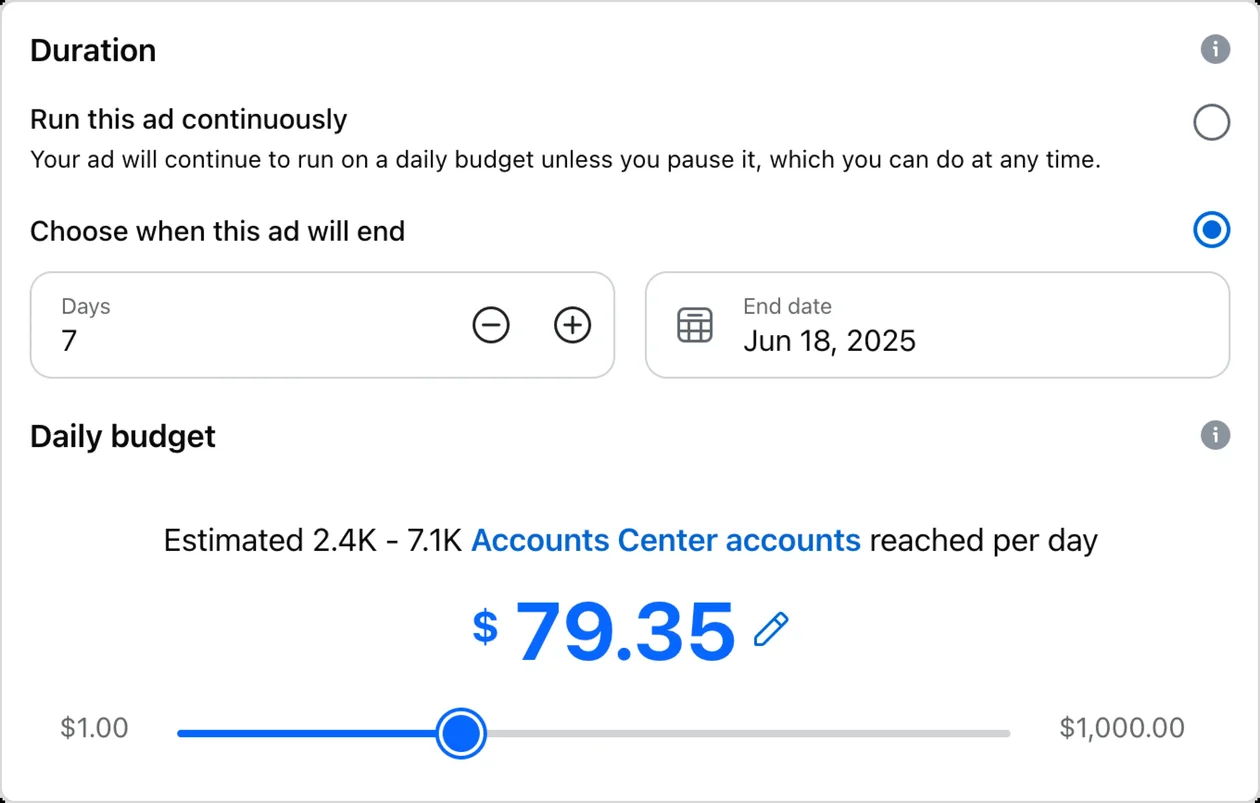
| Duration | Days of publication or end date | 7 days, with an end date |
| Daily budget | How much you spend per day | €5-10 for the first test |
| Placements | Where the post appears | Facebook and Instagram together |
| Payment method | Card or PayPal | Check that it is the right one |
Which objective do you choose?
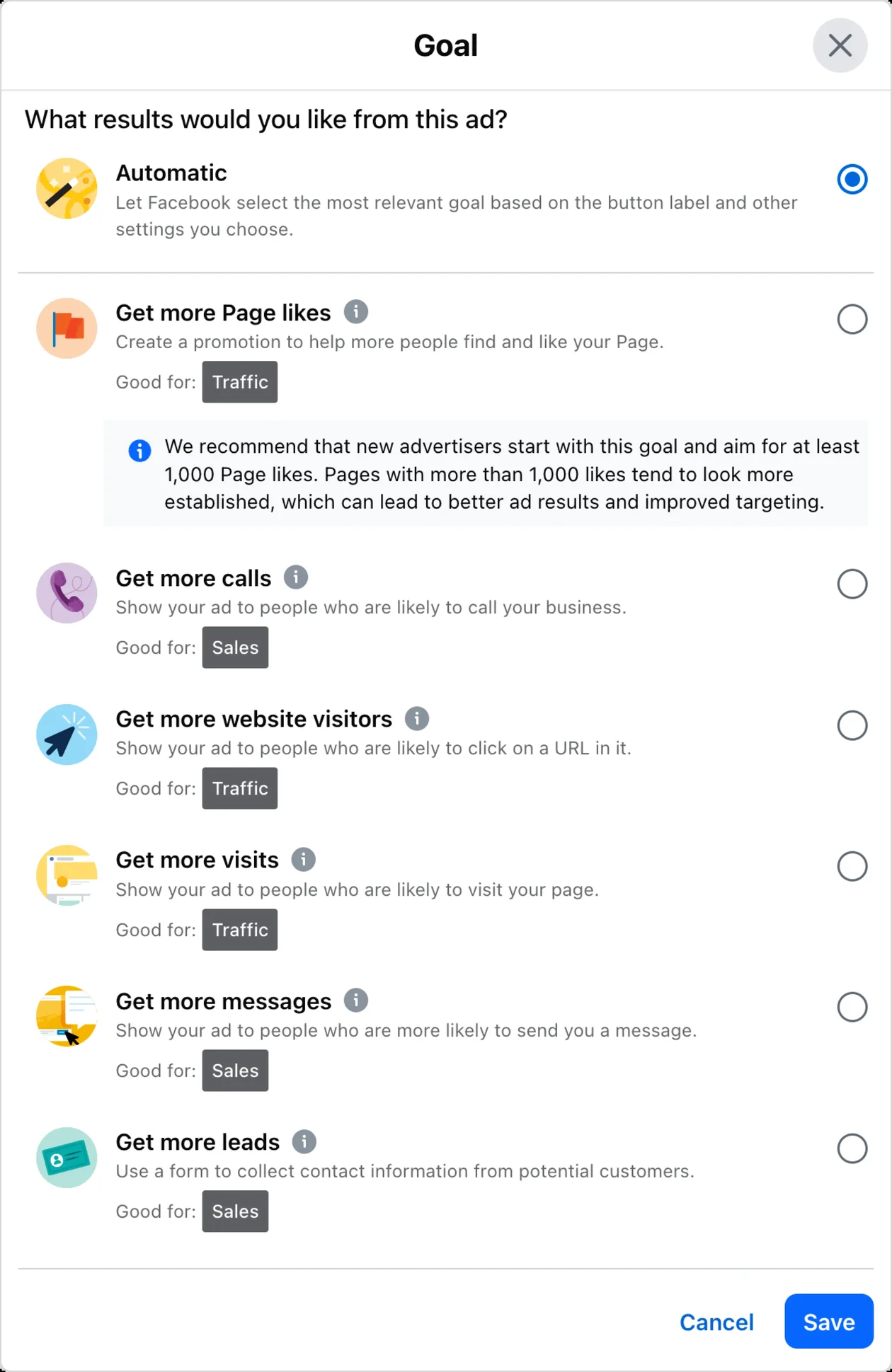
Manually define the goal you want to reach and avoid the "Automatic" option. Choosing automatic mode lets the algorithm decide the optimization based on the graphic elements you upload, making the data hard to interpret at the end of the campaign. See the table below to match your need with the right item and the control metric (Meta Help Center, 2026).
| You want | Objective in the menu | Metric Meta measures |
|---|---|---|
| Show the post to more people | Get more post engagement | Post engagement |
| More followers for the Page | Get more Page followers | New followers attributed to the ad |
| More Page visits | Get more Page visits | Page visits |
| Messages from customers | Get more messages (also WhatsApp) | Conversations started |
| Website visits | Get more people to visit the website | Link clicks |
| Video views | Get more video views | Video views |
| Phone calls | Get more calls | Clicks on "Call now" |
The options to maximize engagement and video plays are available only in boosted posts and are missing from the standard creation flow in Business Manager (Meta, 2026). These two choices attract users used to leaving quick reactions or watching videos, but they do not bring buyers to your checkout.
The platform shows an indicative promotional message: when you select "Get more Page Likes", a suggestion appears urging you to reach 1,000 supporters because "Pages with more than 1,000 Likes tend to look more established" (form screen, June 2025). This suggestion serves to encourage spending: a base of a thousand contacts improves the outward perception of the Page without guaranteeing direct sales.
How do you get more followers for the Page, the old "Likes"?
The quickest method is to use the direct promotion option. From your Page's main screen, tap the "Advertise" command at the top, set the item "Promote your Page" (selecting "Show all" if needed), check the text and graphics preview, set the audience, spend and schedule parameters, then confirm with "Promote now" (Meta Help Center, 2026). The menu offers the wording "Get more Page Likes" or "Get more Page followers" depending on the update of your profile.
This double terminology depends on the gradual elimination of the Like button in favor of the "Follow" command, turning the visible count solely into a number of followers and requiring a new confirmation from those who had not enabled content tracking (Meta Help Center, 2026, feature being rolled out). Campaigns aimed at the old Likes already work to increase total followers.
There is a more effective strategy for collecting qualified contacts: promote a post that concretely shows your services by setting the objective "Get more Page followers". This way people decide to follow you after appreciating a piece of work, a real photo or a finished product. By contrast, promoting the entire Page shows only the cover image and a short description, generating new contacts at low cost who tend to quickly forget why they subscribed.
Considering the average organic engagement rate of 2.2% (Hootsuite, 2025), a base of 1,000 followers generates about 22 spontaneous interactions for each unpaid piece of content. These users act mainly as a starting audience to allow the algorithm to distribute later ads to profiles with similar behavior.
How do you promote a post or a reel on Instagram?
Inside the Instagram app, the standard procedure involves these steps (Instagram Help Center, 2026):
- Go to your profile and tap the post.
- Under the image tap "Promote".
- Choose the Objective. The options are "More profile visits", "More website visits" and "More messages".
- Choose the Audience. "Automatic" shows the post to people similar to your followers; with "Create your own" you set locations, interests, age and gender.
- Set Budget and Duration, then tap "Next".
- Tap "Ad preview" to check the placements and the Advantage+ creatives.
- Tap "Promote post".
The same settings are available via browser from a computer on instagram.com without paying Apple's commission costs. The ad is subjected to automatic review before publication, sending you a notification on the approval status, and the statistics remain available in the "Ad tools" section.
The app does not include a specific item for increasing followers, replaced by the objective "More profile visits". Before spending money to attract users to your profile, you must take care of the presentation: write a clear bio that explains your business, set a legible image, organize your story highlights and check that the last nine photos communicate professionalism to whoever lands on the page for the first time.
As for reels, the "Promote" button is found under the video and the procedure ends with the "Promote reel" command. 2025 data record a cost per click on Instagram Reels 26% lower than the classic Facebook feed (Revealbot, 2025), although this competitive advantage is bound to shrink over time.
By linking the Facebook Page to the Instagram profile you can manage promotions directly from Meta Business Suite, accessing Advantage+ audiences, saved segments and coordinated distribution across both channels with a single operation.
Who do you show the post to? The audience that works in 2026
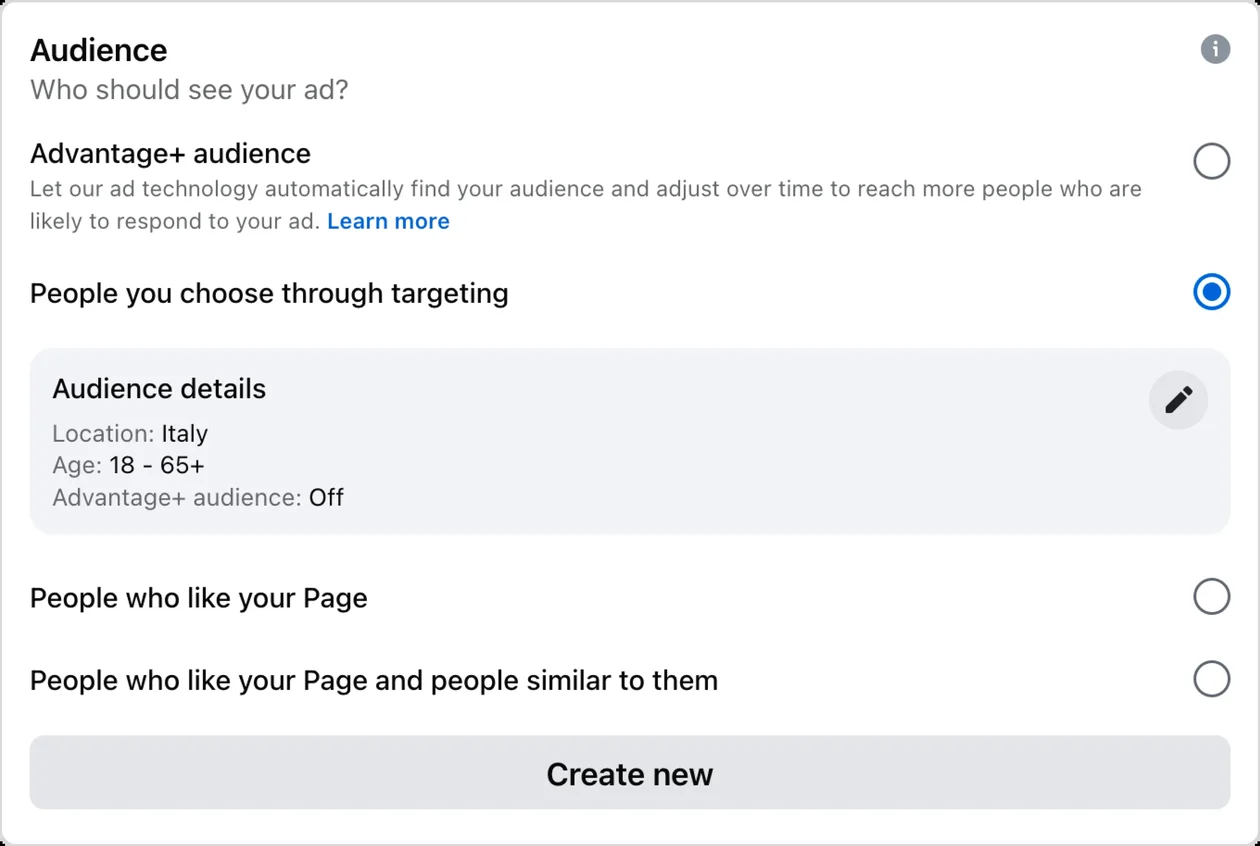
The setup screen on Facebook offers four alternatives: "Advantage+ audience" recommended by the system, "People who like your Page", "People who like your Page and similar people" and "People you choose through targeting", which lets you define location, age, gender and specific interests.
Company data and university research agree on the direction to follow when setting parameters. According to Meta's internal measurements, the Advantage+ system guarantees a 9.7% reduction in cost per result in campaigns oriented to traffic, leads and engagement (Meta Help Center, 2026).
Independent checks confirm the effectiveness of a non-discriminatory approach. An experiment on Facebook based on 135,189 views over 7 days showed that a message personalized on demographic grounds gets a click-through rate of 0.86%, while the neutral variant rises to 1.39% (Shaddy, Friedman and Toubia, Journal of Consumer Research, 2025). The study shows how people experience profiling by gender, age or group membership as annoying, while accepting contextual or non-segmented targeting without problems.
Professional ad management has validated this dynamic: the text and visual quality of the content filter the right audience, making it preferable to keep the audience parameters as open as possible.
The criteria to apply to get started, in order of importance:
- Geographic area is the main constraint. A physical business must delimit the radius around its premises, while a company active nationwide sets the whole of Italy.
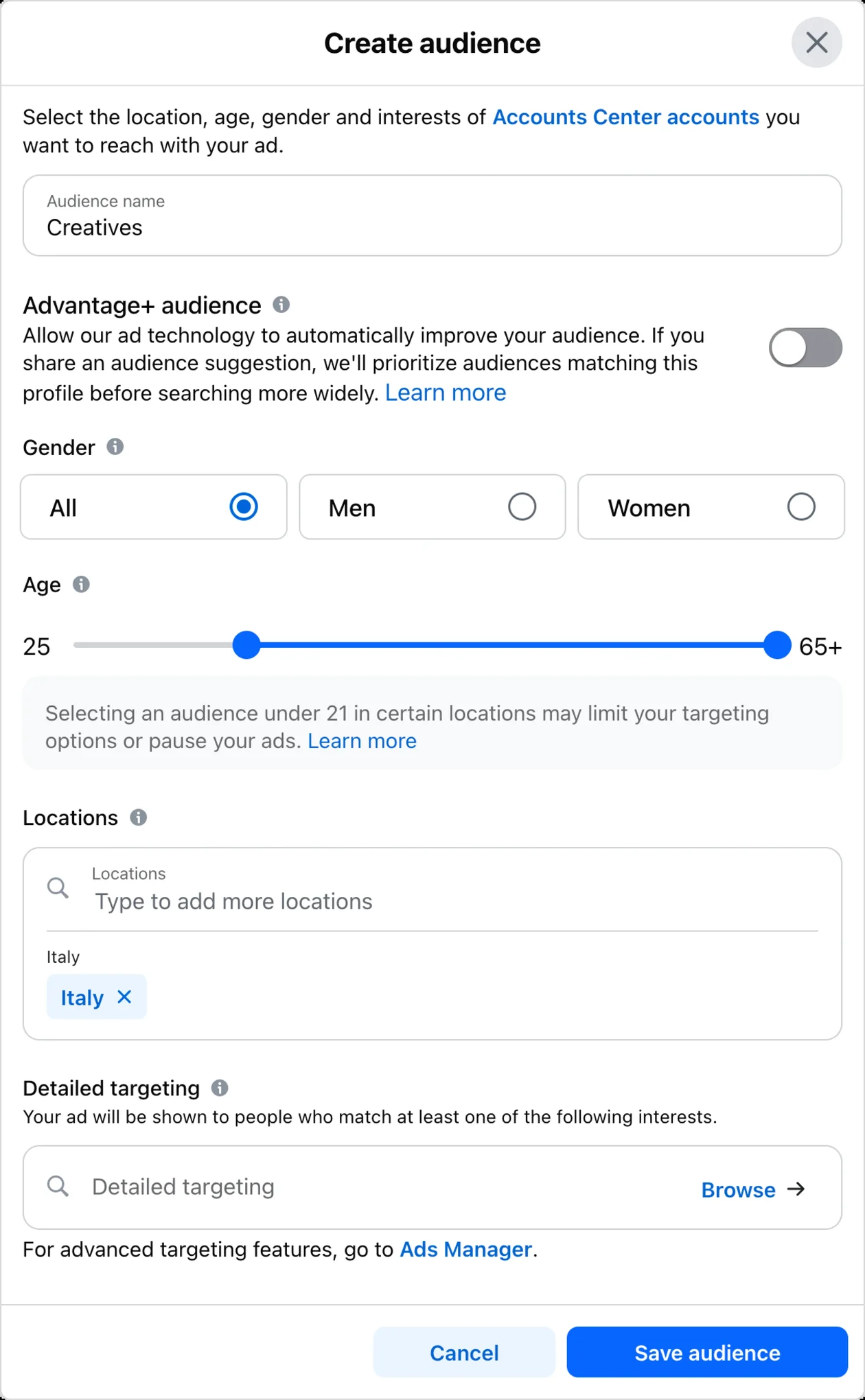
- Keep the age range open between 25 and over 65, barring objective restrictions of the product. For profiles under 18 the platform applies binding restrictions limited to residence and age (Meta, January 2023).
- Always set gender to "All".
- Select at most one single relevant interest. Piling up different parameters fragments the pool, raises the cost per thousand impressions and delegates distribution to opaque affinity mechanisms.
- Save the configuration with a clear name so you can reuse it in later campaigns.
- For recently launched Pages, the option "People who like your Page and similar people" offers a reliable starting base, while selection limited to current followers alone serves almost exclusively for urgent communications aimed at existing customers.
- The Advantage+ audience also suits local businesses, keeping minimum age and geographic location limits rigid and treating the other fields as delivery suggestions (Meta, 2026).
Avoid phrases like "Attention residents over 50" or similar formulas. Address the reader by citing the practical problem to solve, their daily tasks or their work context, never referring explicitly to their demographic characteristics.
How much do you spend and for how long?
The spend form lets you set values between €1 and €1,000 a day, showing an estimate of potential reach (form screen, June 2025). The technical documentation states that the daily budget should equal at least five times the expected cost per single result (Meta Help Center, 2026).
Planning for the Italian market is based on cost-per-thousand-impressions metrics, which in 2025 stand between €8 and €15 (Revealbot, 2025, industry estimate). Investing €5 a day buys between 330 and 600 impressions daily, generating between 2,300 and 4,400 total views over 7 days; dropping below the €5 threshold reduces visibility to about a hundred views a day, making the statistical data insufficient for any technical evaluation.
The initial test phase should stay between €5 and €10 a day for a fixed duration of 7 days, for a total spend between €35 and €70. This period captures the whole weekly pattern and provides a benchmark for future content. The "Run this ad continuously" function should be avoided if you don't check the data regularly, otherwise the post will keep being shown to the same people for months.
Seasonality heavily changes average purchase costs: between October and December, Christmas ad saturation raises rates by 30-50% (Revealbot, 2025). The same ad needs a decidedly higher budget in November than a campaign started in February.
When the target audience is narrow, as happens with neighborhood businesses, repeatedly showing the same graphic wears out the effectiveness of the message. Performance drops on average by 45% after four views by the same user (Meta, 2023), while scientific evidence places a saturation threshold between 3 and 10 spaced exposures before response decays (Eisend and Tarrahi, Journal of Advertising, 2016). Once the scheduled week is over, move on to different content.
Avoid structural changes while the campaign is active: changing spend or audience resets the statistical learning phase. If the results don't meet expectations, stop the ad and create a new one; if performance is positive, increase the investment with gradual rises of 20% spaced a few days apart.
This operational caution is backed by advertising elasticity models: the aggregate analysis of 751 measurements across 56 publications estimates that doubling the budget produces an average short-term sales increase of +12% (Sethuraman, Tellis and Briesch, Journal of Marketing Research, 2011). Abruptly increasing spend mainly serves to buy repeated views directed at the same users already reached.
Which post do you boost?
The quality of the message affects the final return more than the capital invested. A meta-analysis conducted on over a hundred scientific studies shows that the composition of the text, the visual proposition and the framing of the message determine overall results far more than delivery frequency and total spend (Eisend and Tarrahi, 2016). An excellent creative backed by €5 a day beats a weak piece of content scheduled with €50.
Use the selection criterion suggested by the platform: if a post spontaneously gets reactions, comments and shares, it means it has caught the audience's interest and deserves to be extended to new users (Meta Help Center, 2026). Check the statistics of the previous month and invest in the post that recorded the best organic performance, without creating artificial graphics designed only for sponsorship.
The structural criteria for preparing the content:
- Use a single well-defined image or a vertical video. Photo albums and composite formats do not support the quick boost option, requiring the complex configuration of Ads Manager.
- Concentrate the main value in the first two lines of text. Meta shows roughly 125 characters before the "More" command (Meta specifications, 2026), making that space decisive for holding attention.
- Insert a clear action through "Additional contact method", choosing WhatsApp, Messenger or the link to the website. Without this indication, the automatic option will assign a non-optimized destination.
- Exclude before-and-after images if you operate in the fields of wellness, medicine or financial products, to avoid rejections by the automatic reviewers or regulatory warnings.
- Horizontal images uploaded in Stories produce dark, hard-to-read margins. Examine the preview and, if the graphic result is poor, exclude Stories from the placements or adapt the image to the vertical format.
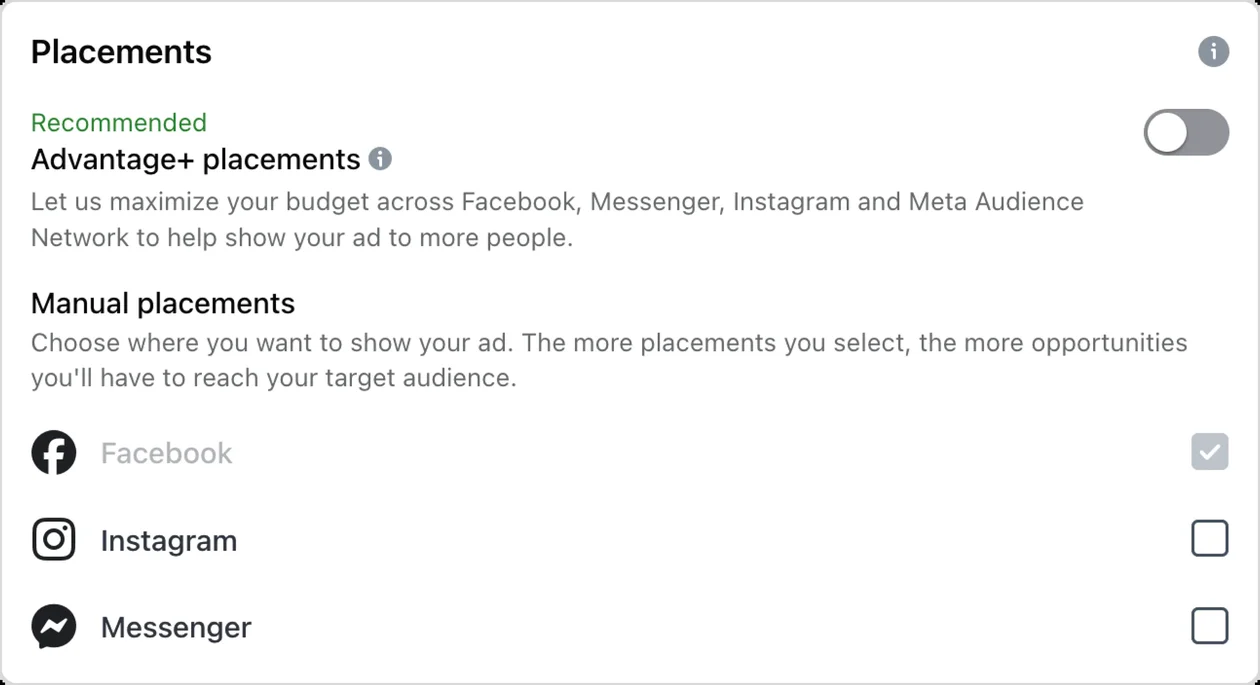
Choosing "Advantage+ placements" splits the budget between Facebook, Instagram, Messenger and Audience Network. This automatic option suits scalable graphics, while with horizontal images it is preferable to select Facebook and Instagram manually.
How do you read the results?
Performance data can be reached from the Page's Ads Center or by pressing "View results" under the post, while on Instagram they are in the "Ad tools" section. The panel shows people reached, investment used and results generated against the assigned objective, including engagement, followers, contacts started or clicks (Meta, 2026). The primary value to monitor remains the cost per result, calculated by dividing total spend by the events recorded.
Two parameters let you understand whether the campaign has anomalies: on the Italian market a CPM above €18 indicates an audience that is too narrow or a quality penalty on the ad (Revealbot, 2025, with Italy CPM €8-15). In parallel, a click-through rate below 0.8% signals a message with little impact, taking into account the average US benchmark of 1.57% (WordStream/LocaliQ, Facebook Ads Benchmarks 2024) and slightly lower Italian values. If the click percentage does not appear among the data, calculate it by dividing link clicks by total views.
At the end of the seven test days you can proceed in two ways: if the cost per result is within the preset limits and has produced actual contacts, you can reactivate the campaign as suggested by Meta's systems, or apply the same audience to a new piece of content. If costs turn out too high, change the creative before touching the spend.
Keep in mind that internal reports count actions through proprietary attribution models, including users who merely viewed the ad. For a street shop the real feedback is measured by checkout visits and messages received, while to track transactions on a website you need Ads Manager combined with the Pixel.
The eight mistakes we see most often
- Starting promotions from the iPhone app, leaving 30% of the spend to Apple (Meta, 2024).
- Keeping the objective on "Automatic" without adding a clear contact button.
- Narrowing the audience too much by combining too many interests, micro geographic areas and limited ages.
- Setting €1 a day for a month, getting traffic volumes too low for any analysis.
- Changing target or budget once the campaign is running, resetting the algorithm's learning.
- Trying to boost albums or reshared content, an operation not allowed by the basic interface.
- Aiming for the "Get more engagement" objective hoping to generate direct commercial sales.
- Writing texts that spell out the reader's age or gender, cutting clicks by 38% (Shaddy, Friedman and Toubia, 2025).
When the boosted post is not enough
The simplified procedure shows its structural limits when the need for advanced analytical measurement emerges. If you sell products online and need to track the economic return on every single purchase, if you want to show dedicated ads to people who visited specific web pages, if you want to use customer lists or if the monthly budget exceeds several hundred euros, you must use Ads Manager with the integration of the Pixel and the Conversions API. The correct setup of these systems for small and medium businesses is described in our guide to AI advertising for SMEs.
Up to that level of complexity, a well-structured post, started from a browser with a broad audience and €5 a day, gives a local business better results than many elaborate campaigns run without criteria with high budgets.
Frequently asked questions
How much does it cost to boost a post on Facebook?
The minimum spend starts at €1 a day. A reliable test phase requires between €35 and €70 in total over 7 days, considering a cost per thousand impressions in Italy between €8 and €15 (Revealbot, 2025).
Can I promote an Instagram post from the Facebook Page?
Yes, by linking the two accounts: from Meta Business Suite or the Ads Center you can select the Instagram content and apply the Facebook options, distributing the ad on both channels.
Can I boost a post from my personal profile?
No, the function requires a Facebook Page or an Instagram account set up as professional.
How long does Meta take to approve the ad?
Every ad is reviewed against the advertising guidelines before distribution, with a final notification sent; most reviews close within 24 hours (Meta Help Center, 2026).
Does the boosted post grow followers?
It does if you specifically set "Get more Page followers" on Facebook or "More profile visits" on Instagram. The option "Get more engagement" collects comments and Likes on the single post without lastingly increasing the user base.
Why is the "Boost" button gray or missing?
The content includes unsupported elements such as albums, shares, copyrighted tracks or stickers in reels, or the ad account has temporary operational suspensions.
Is it better to boost on Facebook or on Instagram?
The decision depends on the channel where your audience is present. In 2025 the cost per click on Instagram Reels was 26% lower than the Facebook feed (Revealbot, 2025), but the best strategy is to test both placements and see where the cost per result is more favorable.
Sources
- Meta, Business Help Center, How to boost a post from your Facebook Page (2026)
- Meta, About boosted posts (2026)
- Meta, Metrics for boosted posts and ads created from your Facebook Page (2026)
- Meta, Types of posts that cannot be boosted (2026)
- Meta, Creating a Page Likes ad (2026)
- Meta, Facebook Page Likes are becoming followers (2026)
- Meta, How to avoid the Apple service fee when boosting content on Facebook (2026)
- Meta, How to avoid the Apple service fee for promotions on instagram.com (2026)
- Meta, Minimum budget best practices (2026)
- Meta, About Advantage+ audience (2026)
- Meta, About ads under review (2026)
- Instagram, Help Center, Promoting an Instagram post (2026)
- Instagram, Promoting an Instagram reel (2026)
- Instagram, Using ad tools to promote an Instagram post (2026)
- Shaddy, Friedman and Toubia, Fairness Perceptions in Demographic Targeting, Journal of Consumer Research (2025)
- Eisend and Tarrahi, The Effectiveness of Advertising: A Meta-Meta-Analysis of Advertising Inputs and Outcomes, Journal of Advertising (2016)
- Sethuraman, Tellis and Briesch, How Well Does Advertising Work? Generalizations from a Meta-Analysis of Brand Advertising Elasticities, Journal of Marketing Research (2011)
- Revealbot, Meta Ads CPC/CPM Benchmarks 2025-2026 (2025)
- WordStream/LocaliQ, Facebook Ads Benchmarks 2024 (2024)
- Meta, Creative Fatigue Research: refresh cadence and signals (2023)
- Hootsuite, Facebook Statistics (2025), cited in our article on organic reach 2026
- Marketing Dive, Meta adds additional ad targeting restrictions for teen users (January 2023)
- Bïrch, How to Boost a Post on Facebook (June 2025), the source of the six form screenshots
PS. The six form screenshots come from Bïrch's June 2025 guide and show the interface in English; the Italian wording quoted in the Italian text is that of the Meta Help Center. The cover image is generated with AI.